PDF Evidence Studio · Windows

PDF review and evidence preparation, built for auditors.

Review documents, apply audit tickmarks, capture whole pages or selected regions, search scanned PDFs, compare versions, and move evidence into your workpapers—all in one local Windows workspace.

Get release updates Download for Windows Coming soon

The Windows release is being prepared. Get release updates and be among the first to know when it becomes available.

  • One-click page capture
  • OCR for scanned support
  • Document comparison
  • Local by default
01 Page Clipper and evidence tray
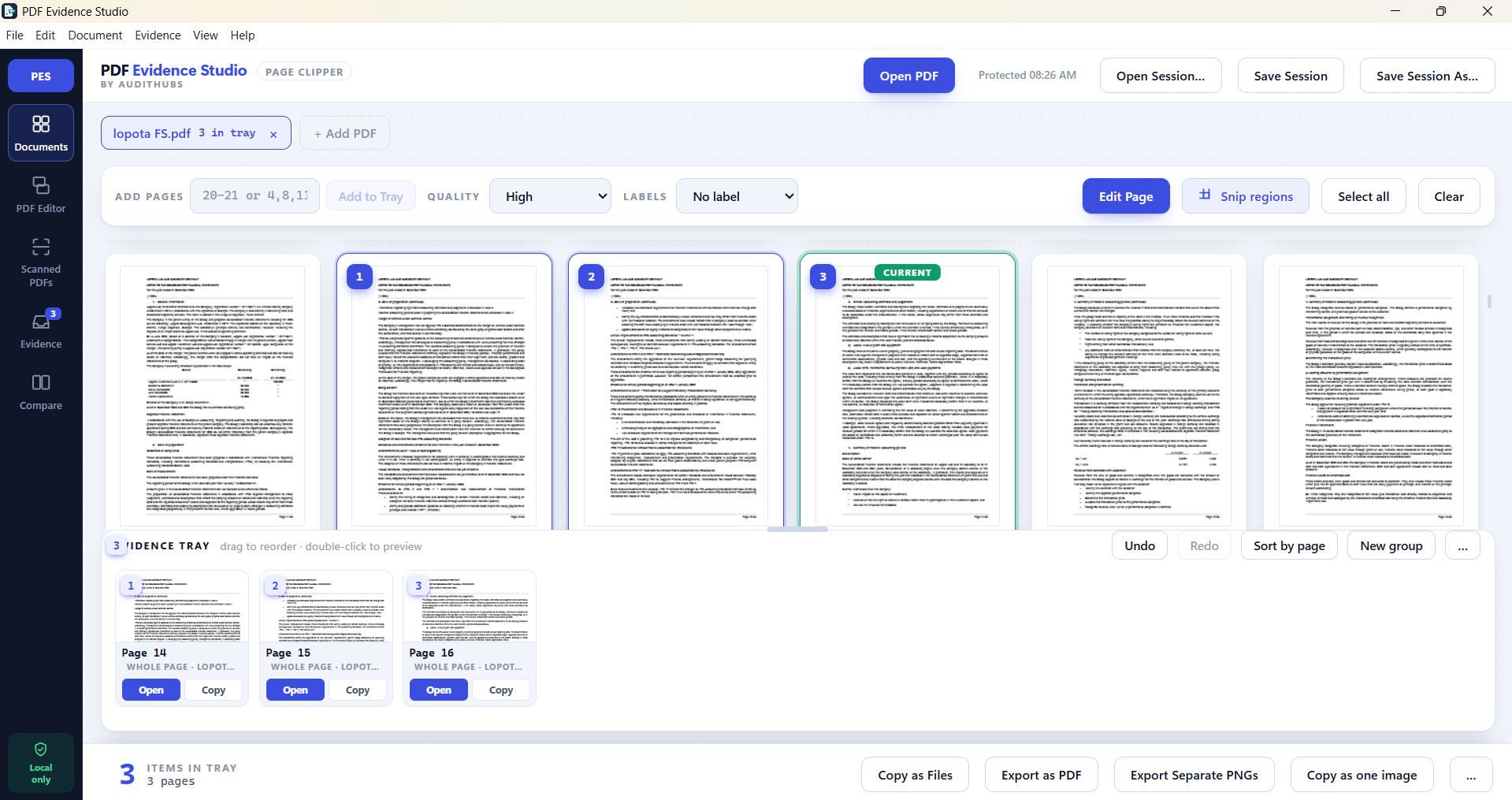
PDF Evidence Studio showing selected PDF pages collected in the evidence tray
Select pages once. Copy or export them wherever you need.

The problem

Audit work happens in PDFs. The tools were not built for it.

Auditors still need to read, understand, test, and conclude. PDF Evidence Studio does not automate professional judgment or perform the audit for you.

It makes the document work around the audit easier: finding support, marking reviewed pages, collecting the exact evidence you need, comparing versions, and moving that evidence into the workpaper without repeating the same manual steps.

THE OPERATING GAP The auditor remains in control. The repetitive PDF handling gets easier.
01A scanned bank statement you cannot search
02Evidence captured by screenshot and pasted somewhere else
03Tickmarks drawn with generic shapes and text boxes
04Current and prior documents compared by eye in two windows
05Work lost after an interruption and rebuilt from memory
06The same preparation steps repeated on every engagement

Origin

Designed by an auditor.

“Why does preparing evidence still require this much manual work?”

PDF Evidence Studio was created by auditor Natia Dekanoidze after encountering the same obstacle repeatedly: preparing reliable evidence took too many disconnected tools and too much work by hand.

The problem was not a lack of effort. It was a gap between how audit evidence is actually prepared and what general-purpose PDF software was designed to do.

01Daily friction

Repeated PDF preparation consumed time and required disconnected tools.

02A working answer

The workflow was shaped by firsthand audit experience and representative procedures.

03Purpose-built

The application follows the work auditors actually perform with evidence.

04A functioning product

The idea became a working Windows desktop application.

One workspace

One workspace for audit evidence preparation.

Five steps, one application. No exporting just to get to the next step.

  1. 01Open

    Bring in one PDF or a group of related documents and work across them together.

  2. 02Review

    Navigate and search whether the file has a text layer or is a scan.

  3. 03Mark

    Add annotations, references, and audit tickmarks made for review work.

  4. 04Capture

    Collect whole pages or selected regions as supporting evidence.

  5. 05Export

    Produce standard PDFs for workpapers and review.

The Page Clipper

Capture the evidence you need. Use it wherever the work goes.

Select a complete page with one click, enter a page range, or snip only the region that matters. Each item is collected in the evidence tray, ready to copy or export without taking separate screenshots one by one.

The application does not decide what is evidence. You do. It makes collecting and moving that evidence faster.

01Select

Choose whole pages, page ranges, or a selected region.

02Collect

Keep supporting items together in the evidence tray.

03Move

Copy as files, export a PDF, create separate PNGs, or copy everything as one image.

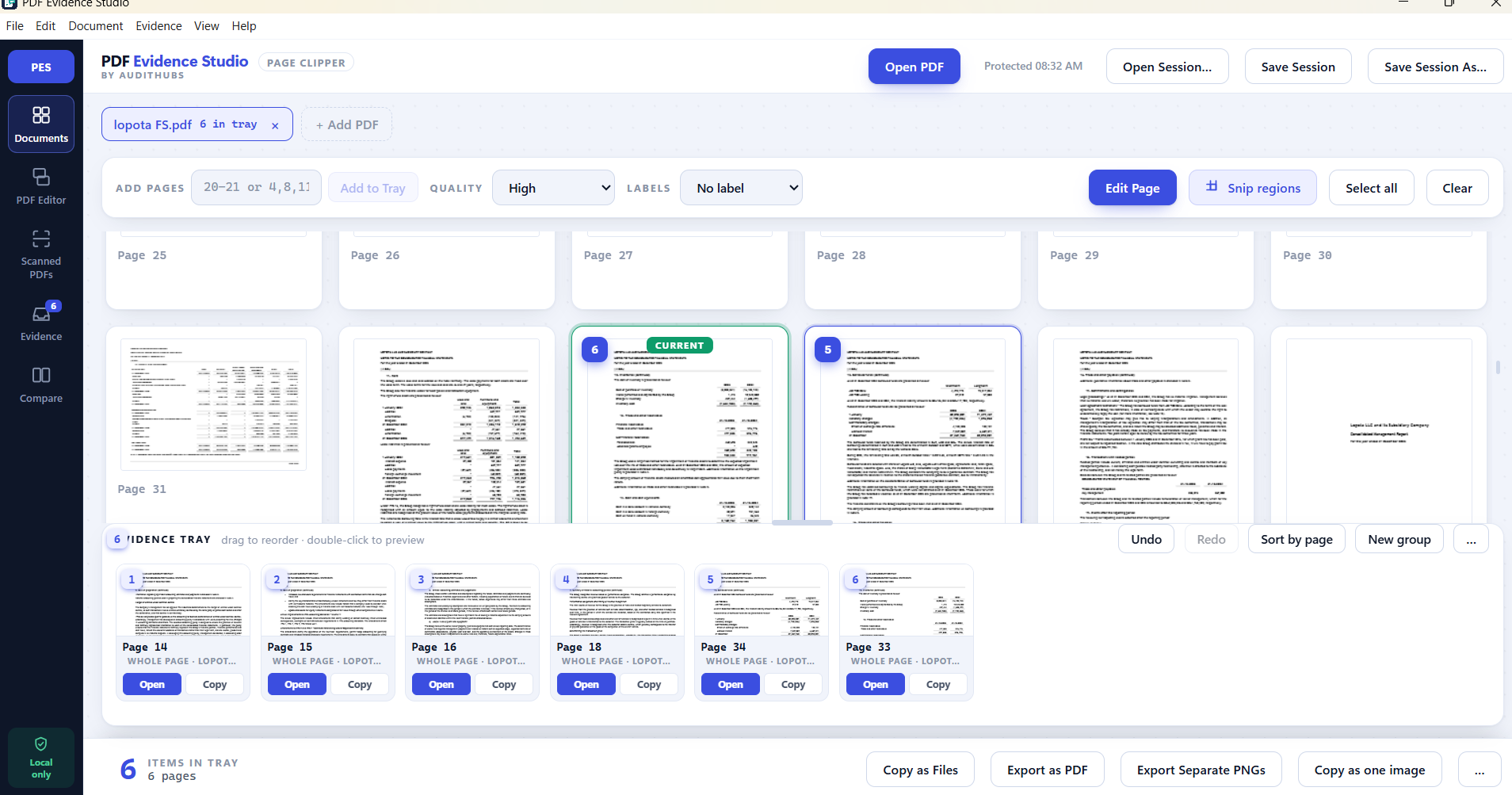
Six selected PDF pages organized in the evidence tray with copy and export options
Page ClipperCollect the exact pages you need and take them into the next step of the audit.

Built for audit workflows

Evidence, not merely annotation.

The difference is not another annotation toolbar. It is a workflow designed around how auditors prepare and use evidence.

01

Evidence, not just annotation

Capture pages or selected areas and organize them as supporting evidence rather than marking a document and moving on.

02

Audit-focused markings

Tickmarks, references, and explanations built around review work—not generic shapes pressed into service.

03

Search scanned support

Find names, amounts, and terms inside image-based bank statements, signed documents, and other scanned PDFs.

04

Document comparison

Review current and prior versions in a workspace built for comparison instead of relying on two windows and your eyes.

05

Recoverable sessions

An interruption does not cost the review. Your work is there when you return.

06

Standard PDF output

Exports are ordinary PDFs that open anywhere. Nothing is locked inside a proprietary format.
PDF editor showing audit tickmarks and annotation tools
Audit-focused PDF editorApply familiar marks and annotations directly to the document.
Side-by-side comparison of two financial statement PDFs with differences highlighted
Document comparisonReview earlier and later versions together and move through detected differences.

Coming soon

Quick Calculator

A practical calculator inside the audit workspace for everyday calculations while reviewing support—without leaving the document to open another tool.

In development

Product foundation

Built around daily audit work.

A functioning Windows desktop application developed around the document workflows auditors perform every day.

  • 01PDF review and audit tickmarks
  • 02Evidence capture from pages and selected regions
  • 03OCR search across scanned documents
  • 04Document comparison
  • 05Session persistence and crash recovery
  • 06Standard PDF export

Planned introductory pricing

Professional audit tools without enterprise software pricing.

Straightforward per-user access when the Windows release becomes available.

PDF Evidence Studio

$7.99/user/month

  • Complete local Windows application
  • OCR, comparison, and evidence capture
  • Product updates included
  • Cancel anytime
Get release updates

Planned introductory price. Final launch terms may change before release.

Local by default

Your client files stay on your machine.

PDF Evidence Studio is a local Windows desktop application. Opening, reviewing, marking, comparing, OCR searching, and exporting happen on your own machine. Client documents and scans are not uploaded to a remote processing service.

LOCAL WORKFLOW Documents stay local. The application only checks the update server for the current software version.

Follow the development

Be among the first to know when the Windows release is available.

Release availability, product updates, and early-access information—sent directly from PDF Evidence Studio.